
The Origin Story
Troubleshooting is one of those skills that people often assume is just an IT thing. Like it’s something you only need if you’re staring at an error screen or trying to figure out why something won’t print.
Realistically, troubleshooting is one of the most universally useful skills you can develop. It applies to everything. Fixing a car, figuring out why a project at work fell apart, diagnosing why your sourdough didn’t rise. The thinking behind it is the same every single time. And once you internalize it, you’ll start spotting the patterns faster, cutting your troubleshooting time down, and building the kind of gut instincts that’ll make people think you’re just naturally good at fixing things.
I didn’t start in IT. I grew up working as a farm hand, worked a ton of odd jobs, dabbled in construction, moved into pipe lining then ultimately landed in plumbing. I spent years figuring out why equipment wouldn’t start, why a line was leaking, why something that worked yesterday didn’t work today.
When I eventually got into IT and started at a helpdesk, the problems were different but the thinking was identical. The same instincts I built up over years of hands-on work are what helped me move from helpdesk to CTO in under 5 years. I didn’t move up because I memorized every Microsoft KB article or Reddit post, but rather I already knew how to think through problems and filter for the most logical answer.
Nobody really teaches this skill either. You’re just kind of expected to figure it out, which can be frustrating. So I wanted to break down the real fundamentals that have helped me in my life, in hopes that it may help someone else along the way as well!
I think about these fundamentals in two buckets. There’s the stuff you actually do to find the problem, and then there’s the habits that make all of that more effective. This image shows how I think about the full troubleshooting toolkit:
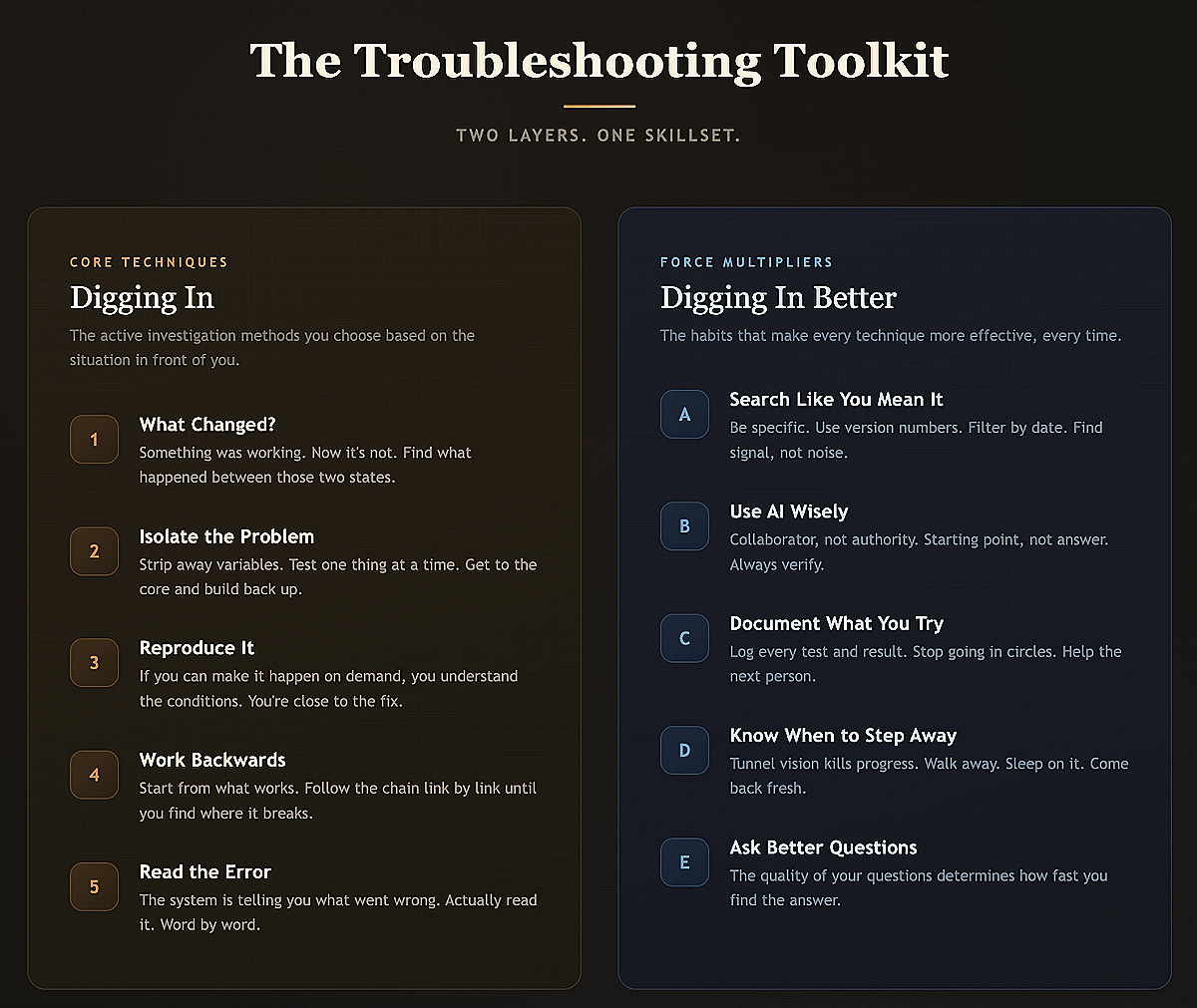
These aren’t steps you follow in order like a checklist. They’re more like tools in a bag that you reach for based on the situation in front of you. Most of the time you’re going to start with “what changed?” because it’s the fastest way to narrow things down. But sometimes you get dropped into a problem with zero context and you have to work backwards from what IS working.
The order matters less than the fact that you’re reaching for the right tool at the right time, and that’s part of what you develop over time with consistent practice. That said, there’s a general flow that works really well for most situations, and that’s how I’ve laid them out below.
Start With What Changed
This is the single most important question you can ask when something breaks: what changed?
Something was working before. Now it’s not. Something happened between those two states. That’s your starting point. Every time. Doesn’t matter if it’s a network issue or a recipe you’ve made a hundred times that suddenly flopped.
People love to skip this step and jump straight to Googling symptoms or throwing random fixes at the wall. But if you can identify what changed, you’ve already narrowed your problem down significantly.
In IT this is huge. A user says “my email stopped working.” Okay, when? This morning? What happened this morning? Oh, there was a password reset last night? There’s likely your answer. Check your equipment uptime too. Does a reboot or a config change coincide with when the issue began? In the MSP world, being able to pull up a log and say “a Conditional Access policy was modified at 2:14 PM yesterday” can be the difference between a 10-minute ticket and a 2-hour rabbit hole.
Isolate the Problem
Most people want to go from “it’s broken” to “it’s fixed” instantly. That rarely works.
Problems are often just a bunch of smaller problems stacked on top of one another. The goal is to strip them away, get down to the core, get that working first, and then slowly layer complexity back on top.
Your car won’t start. It could be the battery, the starter, a fuse, the fuel pump, any number of things. If you replace the battery AND the starter AND the fuel filter all at once and the car starts, what actually fixed it? You just spent money and time on stuff that might not have been broken. Instead, check the battery voltage first. Good? Move on. Try jumping it. Turns over? Now you know your battery was dead. Doesn’t turn over? Now you’re looking at the starter or a fuse. Each test should rule something out and move you forward.
The same applies in IT when troubleshooting a VPN. Can you ping the gateway? Yes? Network is probably fine, move on. Can you authenticate? No? Now it's an auth problem, not a network problem. Each test narrows the scope.
The people who change five things at once and then can’t tell you which one fixed it? They’re starting from zero again next time. One thing at a time. It feels slower in the moment but it saves you so much pain in the long run.
Reproduce It
If you can make the problem happen on demand, you basically own it. Reproducing an issue means you understand the conditions that cause it, and once you understand the conditions, you’re really close to understanding the fix.
Anyone who’s worked a helpdesk knows the pain of “it does it sometimes.” Okay, randomly when? Every day? Only in the morning? Only when you have 47 browser tabs open? Getting specific about reproduction is everything. “It’s broken” is a complaint. “It fails when I do X after Y” is a bug report. Big difference, and it makes a huge difference when you’re escalating to Microsoft support or a vendor.
Work Backwards From What You Know
When you’re really stuck, flip the problem around. Instead of trying to figure out why something is broken, start from what IS working and work backwards toward the break.
If water isn’t coming out of a faucet, you don’t start by digging up the water main. You check the faucet, then the valve, then the pipe, then the supply line. You follow the chain link by link until you find the break.
Network troubleshooting is literally this. You’re basically just walking up and down the OSI model. User can’t reach a website. Can they reach other websites? Can they ping the gateway? Do they have an IP? You’re walking backwards through the stack until you find where it falls apart. It’s not glamorous. It’s just methodical. But it works every single time.
Read the Error Message. No, Actually Read It.
When something gives you an error, a warning, a weird message, anything... actually read it. Slowly. Word by word.
I know that sounds obvious but most people see an error and immediately panic or dismiss it. Error messages are literally the system telling you what went wrong. They’re not always perfectly clear, but they’re almost always pointing you in the right direction.
Over the years, I’ve watched folks screenshot an error and immediately paste it into a chat asking for help without even reading what it says. Half the time the error literally tells you what to do. “Access denied. Contact your administrator.” It’s a permissions problem! “Certificate expired on 01/15/2026.” There’s your answer! Even the ugly ones, like the long PowerShell stack traces or cryptic Azure error codes, they still give you a thread to pull on.
Search Like You Mean It
One of the most underrated troubleshooting skills is knowing how to search effectively. When I started in IT, troubleshooting meant Googling the error, finding a forum post from 2009, scrolling past four “me too” replies, and finding the one answer with a green checkmark. The sources have evolved but the skill of searching well is just as important as ever.
Be specific. Don’t search “email not working.” Search “Microsoft 365 autodiscover failing external DNS.” Include version numbers and product names. Filter your results to the last year or month because a solution from 2019 might not be relevant in a cloud environment that’s changed three times since then. And learn to filter out the noise. A Microsoft Learn doc from someone who clearly reproduced the issue is worth 50 forum threads full of speculation.
Use Your Tools Wisely
The tools are really different now than they were even a few years ago, and the biggest shift is obviously AI. But the thing I think a lot of people are getting wrong is this: the tools don’t replace the process. If you don’t understand how to troubleshoot, AI will just help you be wrong faster.
AI is an incredible troubleshooting tool. I use it constantly! But use it as a collaborator, not as an authority. It's great at synthesizing information, explaining error messages in plain language, and brainstorming possible causes. It's not great at knowing the current state of your specific environment or always being accurate about product details that change frequently.
The biggest mistake I see is treating AI output as the answer instead of a starting point. If AI gives you five possible reasons your Intune policy isn’t applying, great, but you still need to go check each one. And please, don’t blindly paste AI-generated commands into production. Read them. Understand them. Test them somewhere safe. AI can and will hallucinate commands that look right but aren’t.
AI makes a good troubleshooter faster. It makes a bad troubleshooter more confident. And that’s a pretty dangerous combo.
Document What You Try
When you’re in the middle of troubleshooting something complex, write down what you’ve tried and what the result was. Even just quick notes.
There’s nothing worse than being two hours into a problem and thinking “wait, did I already try that?” A simple log keeps you moving forward and prevents you from going in circles.
In the MSP world this matters even more because your teammates might need to pick up where you left off. A ticket that says “troubleshot the issue and resolved it” is useless. A ticket that says “checked DNS, confirmed autodiscover CNAME was missing, added the record, verified in Remote Connectivity Analyzer, working now” is something the next tech can learn from. It’s also something YOU can reference six months later when another client has the same problem.
Know When to Step Away
Sometimes the best troubleshooting move is closing your laptop and going for a walk. Your brain does a lot of processing in the background, and when you’re hyper-focused for too long you develop tunnel vision. You get fixated on one theory and stop seeing other possibilities.
I can’t tell you how many times I’ve been completely stuck on something, walked away, and then the answer just hit me 20 minutes later while doing something totally unrelated. If it’s not a production-down emergency, sleep on it. You’ll almost always see it differently in the morning.
Stubbornness is not the same thing as persistence.
Ask Better Questions
Troubleshooting is really just asking questions in the right order. And the quality of your questions determines how fast you get to an answer.
Bad question: “Why is this broken?”
Better question: “What specifically isn’t working?”
Even better: “When did it stop working and what happened right before that?”
This applies when you’re questioning a user, prompting AI, or just talking yourself through a problem. “My computer is slow” gives you nothing. “My computer started running slow after the last Windows update and it’s specifically slow when opening Office apps” gives you a clearer path.
And if you’re someone who asks for help in chats, Slack channels, or Discord communities, check out dontasktoask.com - it’s worth the quick detour! The core idea is simple: don’t ask “is anyone here who knows about X?” Just ask your actual question with specific and relevant details. You’ll get better help faster, and you’ll practice the skill of formulating clear, specific questions in the process.
Further Reading
If you’re in IT or the MSP space and want to go deeper on what it means to operate as a technician, I’d really recommend reading Mendy Green’s Laws for the Practical Technician over at Rising Tide. It covers a lot of complementary ground around the technician mindset, reading the screen, being intentional, and questioning your assumptions. I’ve shared it with my teams many times over the years and it’s always worth revisiting.
The Takeaway
Troubleshooting is a process. And the people who are “good at fixing things” have just internalized these fundamentals and apply the techniques consistently.
Start with what changed. Isolate variables. Reproduce the issue. Work backwards. Read the errors. Search well. Use your tools wisely. Document your steps. Step away when you need to. Ask better questions.
The tools will always keep evolving. AI is going to get better. New platforms and products will come and go. But these fundamentals are the same now as they were when I was diagnosing a root infested sewer line, and they’re the same as when I was sitting in a helpdesk trying to figure out why someone’s Outlook wouldn’t open. The problems may change, but the approach doesn’t.
That’s really it. The rest just comes with repetition!